ACH Balance Pre-check verifies that a renter has enough funds in their bank account before an ACH payment is processed. You turn it on per renter — not for your whole portfolio — so you can use it for tenants who need extra protection against NSF returns.
Make sure all of the following are true:
Your PayRent service plan includes Balance Check (also shown as “Verify bank balance before ACH payments”).
Your plan includes Accept ACH.
The renter’s property allows ACH payments.
If Balance Check is not on your plan, the option will not appear in renter settings. Contact PayRent support or upgrade your plan to unlock it.
Sign in to PayRent as a landlord.
Go to Renters.
Find the renter you want to update.
Open the renter’s menu (⋯) and select Edit Renter Details.
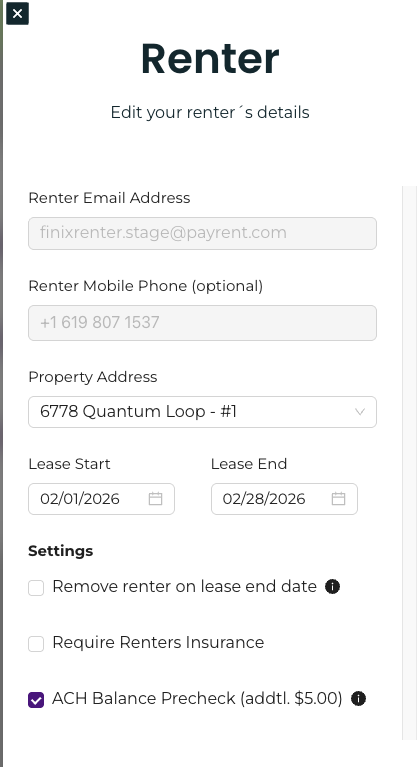
In the renter settings panel, check ACH Balance Precheck (addtl. $X.XX). The dollar amount is your plan’s balance verification fee (typically $3.00).
Save your changes.
On the Renters list, that renter’s badge will show ACH Balance Precheck On.
The renter always pays the balance verification fee. It is charged only when the check runs successfully.
This fee is separate from regular ACH processing fees. Your property’s Absorb ACH fees setting does not apply to the balance verification fee — even if you absorb 100% of ACH fees, the renter still pays the balance check fee. On Make Payment, the renter sees a line like: Balance verification fee: $3.00.
When that renter pays by ACH:
They see that balance verification is required.
A balance verification fee may appear in the payment total.
PayRent shows “Verifying account balance…” while the check runs.
The payment proceeds only if the balance check passes. If it fails, the payment is declined and the renter can try another method or fund the account.
Balance Check applies to supported ACH bank payments only — not to card payments.
Open Edit Renter Details for that renter.
Uncheck ACH Balance Pre-check.
Save.
The Renters list badge will show ACH Balance Precheck Off.
Use Balance Check for renters with prior NSF returns or tight cash flow — you don’t need it on every tenant.
Hover or tap the info icon next to the checkbox for a short reminder: it reduces NSF risk by verifying bank balance before ACH payments.
If you don’t see the checkbox, confirm your plan has Balance Check and Accept ACH, and that the property accepts ACH.